Java常用工具类全面解析:包装类、字符串、时间日期、枚举、文件操作、递归与综合案例。
包装类 什么是包装类 Java是面向对象的语言,但不是纯面向对象,因为其里面有一些不是面向对象的东西。但实际使用中我们却需要将基本数据类型转换成对象,比如Object数组操作的过程中,就需要将基本数据类型转换成对象。
为了解决这个问题,在设计类的时候,Java为每一个基本数据类型都设计了一个对应的类进行代表,共8个,这些类被称之为 包装类
包装类都存在于java.lang 包下,除了int、char之外,其余6个基本数据类型的包装类类名都是数据类型名称首字母大写
基本类型
包装类
byte
Byte
short
Short
int
Integer
long
Long
float
Float
double
Double
char
Character
boolean
Boolean
并且前6个包装类都是 数值型 ,都继承自 Number 类,都有 xxxValue 方法,这就意味着这6个类之间可以互相转型
包装类的出现作用主要有两个
让基本数据类型可以像对象一样操作,可以调用一些方法,可以有封装思想,此外,在对应的包装类中都定义了它们的最小范围和最大范围,使用时降低了超出范围的风险
为基本数据类型提供了null 值,解决了“没有填写”这个场景
基本类型&包装类 基本类型转包装类 基本类型转包装类可以使用包装类的构造方法
1 2 3 4 public Integer (int value) ;public Integer (String s) ;
代码示例
1
2
3
4
5
6
7
8
9
10
11
12
package com.leo.wrapper;public class Demo2Wrapper { public static void main (String[] args) { int num = 10 ; Integer num1 = new Integer (num); System.out.println(num1); Integer num2 = new Integer ("12345" ); System.out.println(num2); } }
我们可以使用包装类的 valueOf 方法,将字符串或者基本数据类型转成对应的包装类对象
1
2
3
4
5
6
7
8
9
10
11
package com.leo.wrapper;public class Demo2Wrapper { public static void main (String[] args) { Integer num3 = Integer.valueOf(123 ); Integer num4 = Integer.valueOf("456" ); System.out.println(num3); System.out.println(num4); } }
注意
Character类型的valueOf方法和构造方法不能接收字符串作为参数
Boolean类型接收字符串时,只有字符串内容为true(不区分大小写)时,转换的包装类结果才是true,其余值(即使是null),结果都是false
数值型包装类接收字符串时,字符串内容必须为纯数值。否则会抛出 NumberFormatException
包装类转基本类型 Number类中提供了 xxxValue方法,这些方法就可以将包装类转换成基本数值型
1
2
3
4
5
6
7
8
9
10
11
12
13
14
15
16
17
18
19
20
package com.leo.wrapper;public class Demo3Wrapper { public static void main (String[] args) { Integer num = new Integer (128 ); int num1 = num.intValue(); long num2 = num.longValue(); short num3 = num.shortValue(); byte num4 = num.byteValue(); float num5 = num.floatValue(); double num6 = num.doubleValue(); System.out.println(num1); System.out.println(num2); System.out.println(num3); System.out.println(num4); System.out.println(num5); System.out.println(num6); } }
在调用这些方法时,对于精度不够的情况下,不会报错,而是丢失超出的范围。
基本类型&字符串 字符串转基本类型 包装类中都有一个静态方法,能够将字符串转换成对应的基本类型,比如 Integer 中的静态方法就是 parseInt,Double 中的静态方法就是 parseDouble,唯独需要注意的是,没有 parseChar
1
2
3
4
5
6
7
8
9
10
11
12
13
14
15
package com.leo.wrapper;public class Demo4Wrapper { public static void main (String[] args) { double num = Double.parseDouble("3.1415926" ); System.out.println(num); System.out.println(Boolean.parseBoolean("true" )); System.out.println(Boolean.parseBoolean("TRUE" )); System.out.println(Boolean.parseBoolean("tRUE" )); System.out.println(Boolean.parseBoolean("false" )); System.out.println(Boolean.parseBoolean("abc" )); System.out.println(Boolean.parseBoolean(null )); } }
注意
Character 没有 parseChar 方法,所以字符串不能转换成char类型对于Boolean类型,接收的字符串只有为 true 时(不区分大小写),转换的结果才是true,其余都是false(null也是false)
基本类型转字符串 每一个包装类中都有一个静态的 toString 方法,此外,还可以将基本类型后面拼接一个空字符串,将其转换成字符串类型。
1
2
3
4
5
6
7
8
9
package com.leo.wrapper;public class Demo5Wrapper { public static void main (String[] args) { System.out.println(Integer.toString(123 )); System.out.println(123 +"" ); } }
自动拆箱装箱(重点) 自动拆箱自动装箱 在创建了一个对象数组时,可以直接赋值多个基本类型,这个过程就产生了自动装箱。
自动装箱就是指,基本数据类型处于需要对象的环境时,会自动转换成对象。下面有一段代码就是典型的自动装箱
1
2
3
4
5
6
7
8
9
10
package com.leo.wrapper;public class Demo6Wrapper { public static void main (String[] args) { Integer num = 1 ; Double num2 = 3.14 ; Long num3 = 1L ; } }
在JDK5之前,这个语法是错误的,而JDK5之后,则提供了这种装箱机制,JVM帮我们执行了 Integer num = Integer.valueOf(1)。
注意:自动装箱不能存在数据类型转换,比如 int 类型就不能自动装箱为Long类型
反之,当包装类型处于需要基本类型的环境时,会自动转换成基本类型,这就是自动拆箱。
1
2
3
4
5
6
7
8
9
10
11
12
13
package com.leo.wrapper;public class Demo6Wrapper { public static void main (String[] args) { Integer num = 1 ; Double num2 = 3.14 ; Long num3 = 1L ; int n1 = num; double n2 = num2; long n3 = num; } }
注意:自动拆箱可以存在数据类型转换,比如可以把Integer类型转换成long类型
注意:自动拆箱,不能将null值赋值给基本类型,因为自动拆箱本质上是调用了 xxxValue 方法,null不可以调用法,会出现空指针异常
1
2
3
4
5
6
7
8
9
package com.leo.wrapper;public class Demo7Wrapper { public static void main (String[] args) { Integer num = null ; int n1 = num; } }
包装类的比较与缓存 包装类的本质是一个对象,对象之间使用 == 进行比较,比较的是堆内存中的地址,思考下面代码
1
2
3
4
5
6
7
8
9
10
11
12
13
14
15
16
17
package com.leo.wrapper;public class Demo8Wrapper { public static void main (String[] args) { Integer num1 = 100 ; Integer num2 = 100 ; Integer num3 = 1000 ; Integer num4 = 1000 ; int num5 = 100 ; int num6 = 1000 ; System.out.println(num1 == num2); System.out.println(num3 == num4); System.out.println(num3 == num6); System.out.println(num1 == num5); } }
上面的代码中,为什么num3与num4比较会是false,而其余的都是true呢?
num3和num4都是包装类对象,二者使用 == 比较,比的是堆内存中的地址,两个对象地址肯定不一样,所以是false,而下面的两个比较都是包装类和基本类型进行比较,这个时候包装类会被拆箱成基本类型,本质上是基本数据类型的==比较,比的是值,所以是true。
按照上面的解释,3个比较都很合理,但是为什么 num1==num2的结果是true?
这里面使用到了包装类的缓存机制
1
2
3
4
5
6
@IntrinsicCandidate public static Integer valueOf (int i) { if (i >= IntegerCache.low && i <= IntegerCache.high) return IntegerCache.cache[i + (-IntegerCache.low)]; return new Integer (i); }
对于整数型包装类,都会在内部维护一个缓存数组,缓存范围是 -128~127 ,只要valueOf创建的值或者自动拆箱创建的值范围在这个区间,就会直接从缓存中取,此时不管创建多少次,最终结果都是同一个对象,因此==比较结果是true。
最终我们得出个结论:包装类之间比较一定要使用 equals 方法,不要使用==
整数进制转换(了解) 十进制转其他进制 在Integer类中,存在 toXxxString 方法,作用是将这个十进制的Integer转换成对应进制
1
2
3
4
5
6
7
8
9
10
11
12
13
package com.leo.wrapper;public class Demo9Wrapper { public static void main (String[] args) { System.out.println(Integer.toBinaryString(1024 )); System.out.println(Integer.toOctalString(1024 )); System.out.println(Integer.toHexString(1024 )); } }
其他进制转十进制 Integer中的parseInt方法可以将其他进制转十进制
1
2
3
4
5
6
7
8
9
10
11
12
13
package com.leo.wrapper;public class Demo9Wrapper { public static void main (String[] args) { System.out.println(Integer.parseInt("10000000000" , 2 )); System.out.println(Integer.parseInt("400" , 16 )); } }
大数字运算 BigInteger Java中的整数类型有4中,其中long类型表示的范围最大,但是依然有范围限制,如果想要描述更大的整数时,就需要借助BigInteger
BigInteger类数学运算方法摘要
BigInteger add(BigInteger augend)
加法运算
BigInteger subtract(BigInteger subtrahend)
减法运算
BigInteger multiply(BigInteger multiplicand)
乘法运算
BigInteger divide(BigInteger divisor)
除法运算
BigInteger[] divideAndRemainder(BigInteger val)
求余运算
1
2
3
4
5
6
7
8
9
10
11
12
13
14
15
16
17
18
19
20
21
22
23
24
package com.leo.wrapper;import java.math.BigInteger;public class Demo10Wrapper { public static void main (String[] args) { BigInteger num1 = new BigInteger ("100000000000000000000" ); BigInteger num2 = new BigInteger ("3" ); BigInteger add = num1.add(num2); System.out.println("加法运算:" + add); BigInteger subtract = num1.subtract(num2); System.out.println("减法运算:" + subtract); BigInteger multiply = num1.multiply(num2); System.out.println("乘法运算:" + multiply); BigInteger divide = num1.divide(num2); System.out.println("除法运算:" + divide); BigInteger[] remainder = num1.divideAndRemainder(num2); System.out.println("求与运算:" + remainder[0 ] + "...." + remainder[1 ]); } }
BigDecimal 1 2 3 4 5 6 7 8 package com.leo.wrapper;public class Demo11Wrapper { public static void main (String[] args) { System.out.println(0.1 +0.2 ); } }
上面的计算结果不是0.3,因为float和double类型的主要设计目的是为了科学计算和工程计算,但是并没有提供完全精确地结果,因此不应该应用于精确度较高的场景
但是商业性质的计算往往要求结果精确,此时就需要使用BigDecimal
需要注意的是,BigDecimal在使用时,一定要使用字符串类型的构造方法
1 2 3 4 5 6 7 8 9 10 11 12 13 14 15 16 17 18 package com.leo.wrapper;import java.math.BigDecimal;public class Demo11Wrapper { public static void main (String[] args) { System.out.println(0.1 +0.2 ); BigDecimal num1 = new BigDecimal (0.2 ); BigDecimal num2 = new BigDecimal (0.1 ); System.out.println(num1.add(num2)); BigDecimal num3 = new BigDecimal ("0.1" ); BigDecimal num4 = new BigDecimal ("0.2" ); System.out.println(num3.add(num4)); } }
BigDeciaml在使用时,与BigInteger几乎一样
注意,在使用除法运算时,不同之处在于,一定要保留指定位数的小数,因为可能会存在除不尽的情况
1 public BigDecimal divide (BigDecimal divisor, int scale, RoundingMode roundingMode)
第二个参数是保留的小数位数,第三个参数是保留方式
RoundingMode.UP:向上取整,对于负数,按照绝对值向上取整
RoundingMode.DOWN:向下取整,对于负数,按照绝对值向下取整
RoundingMode.CEILING:向上取整,对于负数,同样按照大小向上取整
RoundingMode.FLOOR:向下取整,对于负数,同样按照大小向下取整
RoundingMode.HALF_UP:四舍五入
RoundingMode.HALF_DOWN:五舍六入
如果仅仅想对一个小数进行保留指定位操作,不进行计算,此时可以使用setScale方法,使用方式与除法一样
1 public BigDecimal setScale (int newScale, RoundingMode roundingMode)
随堂练习
接收从键盘输入的字符串格式的年龄,分数和入学时间,转换为整数、浮点数,并在控制台输出
1 2 3 4 5 6 7 8 9 10 11 12 13 14 15 16 17 18 19 20 21 22 23 24 25 package com.leo.wrapper.test;import java.util.Scanner;public class Test1 { public static void main (String[] args) { Scanner scanner = new Scanner (System.in); System.out.println("请输入年龄:" ); String ageStr = scanner.next(); System.out.println("请输入分数:" ); String scoreStr = scanner.next(); System.out.println("请输入入学时间:" ); String date = scanner.next(); int age = Integer.parseInt(ageStr); Double score = Double.valueOf(scoreStr); System.out.println(age); System.out.println(score); System.out.println(date); } }
String String概述 String类对象代表不可变的Unicode字符序列,因为String内部维护了一个final数组,这就意味着这个数组只能被赋值一次,因此是不可变的。
字符串常量池 首先看下面的代码
1 2 3 4 5 6 7 8 9 10 11 12 13 14 15 16 17 18 19 package com.leo.string;public class Demo3 { public static void main (String[] args) { String s1 = "HelloWorld" ; String s2 = "HelloWorld" ; String s3 = new String ("HelloWorld" ); String s4 = "Hello" ; String s5 = "World" ; String s6 = s4+s5; final String s7 = "Hello" ; final String s8 = "World" ; String s9 = s7+s8; System.out.println(s1==s2); System.out.println(s1==s3); System.out.println(s1==s6); System.out.println(s1==s9); } }
上面的代码运行结果是 true、false、false、true,这是因为在JVM中有一块区域被称之为字符串常量池
JDK6及以前,字符串常量池存在于方法区中,JDK7及以后,字符串常量池存在于堆内存中(但是逻辑上还是属于方法区)
一旦在程序中使用到了字符串常量,就会将这个常量存储到字符串常量池中。下一次使用同样的字符串常量时,会先从字符串常量池中找,如果找到了,直接返回,否则则创建新的对象。这里有一个优化机制,如果是两个常量拼接,JVM会在编译时将其优化成拼接后的结果
首先创建s1的HelloWorld,此时字符串常量池中没有HelloWorld,因此创建新的对象,然后再将其存储到字符串常量池中
再创建s2变量,此时HelloWorld常量在常量池中已经存在,直接返回引用即可,不会创建新的对象,因此s1==s2
创建s3时,构造方法中的HelloWorld依然是常量,因此还是去常量池中找,但是这个字符串仅仅是构造方法创建对象时使用的一个参数而已,只要new了必然会存在新的对象,并且new出来的并不是字符串常量,不会存储到字符串常量池中,s1!=s3
两个字符串常量进行拼接时,JVM会在编译期将其优化成拼接后的结果,s4和s5是变量,不会被优化,会创建新的对象,并且新的对象不会存储到字符串常量池中,所以s1!=s6。而s7和s8是final修饰的常量,常量拼接会被优化,s9在编译期就被优化成了HelloWorld,此时就会从字符串常量池中寻找,找到后直接使用,因此 s1==s9
字符串查找方法 获取字符串长度 length方法,用于获取字符串中有多少个字符
1 2 3 4 5 6 7 8 9 package com.leo.string;public class Demo4Length { public static void main (String[] args) { String s = "Hello" ; System.out.println(s.length()); } }
charAt方法 charAt(int index) 方法用来获取字符串指定索引位置的字符
1 2 3 4 5 6 7 8 9 10 11 package com.leo.string;public class Demo5CharAt { public static void main (String[] args) { String s = "Hello" ; System.out.println(s.charAt(0 )); System.out.println(s.charAt(3 )); System.out.println(s.charAt(5 )); } }
indexOf方法 indexOf方法用于获取某字符/字符串,在指定字符串中第一次出现的位置,如果找到了,返回索引,没有找到,返回-1
1 2 3 4 5 6 7 8 9 10 11 12 13 package com.leo.string;public class Demo6IndexOf { public static void main (String[] args) { String s = "HelloWorldLeoJigeLeige" ; System.out.println(s.indexOf('W' )); System.out.println(s.indexOf("ge" )); System.out.println(s.indexOf("W" , 5 )); } }
注意,fromIndex参数包含它自身所在的字符
lastIndexOf 该方法作用与indexOf方法类似,但是是从后往前找
1 2 3 4 5 6 7 8 9 10 11 12 package com.leo.string;public class Demo7LastIndexOf { public static void main (String[] args) { String s = "HelloWorldLeoJigeLeige" ; System.out.println(s.lastIndexOf('e' )); System.out.println(s.lastIndexOf("ge" )); System.out.println(s.lastIndexOf("o" , 11 )); } }
lastIndexOf只是查找方式从后往前查,但最终返回的索引位置还是从前往后计算的位置
这里的fromIndex并不是字符串的截取操作,而是从哪里开始查,上面的案例中是从索引11位置处开始,从后往前查
startsWith 该方法的作用是判断字符串是否以某个字符串开头
1 2 3 4 5 6 7 8 9 10 11 12 13 package com.leo.string;public class Demo8StartsWith { public static void main (String[] args) { String s = "HelloWorld" ; System.out.println(s.startsWith("H" )); System.out.println(s.startsWith("" )); String url = "http://www.baidu.com" ; System.out.println(url.startsWith("http://" ) || url.startsWith("https://" )); } }
endsWith 它的使用方式与startsWith相似,作用是判断字符串是否以某字符串结尾
1 2 3 4 5 6 7 8 9 10 11 12 13 package com.leo.string;public class Demo9EndsWith { public static void main (String[] args) { String s = "HelloWorld" ; System.out.println(s.endsWith("d" )); System.out.println(s.endsWith("" )); String url = "http://www.baidu.com" ; System.out.println(url.endsWith("http://" ) || url.endsWith("https://" )); } }
contains方法 该方法的作用是判断字符串中是否包含指定的字符串
1 2 3 4 5 6 7 8 9 package com.leo.string;public class Demo10Contains { public static void main (String[] args) { String s = "HelloWorldLeoJgLg" ; System.out.println(s.contains("Leo" )); } }
字符串转换方法 字符串转数组
*String类中字符串转数组方法摘要*
[String](mk:@MSITStore:C:\Users\Administrator\Desktop\jdk api 1.8_google.CHM::/java/lang/String.html)[] split ([String](mk:@MSITStore:C:\Users\Administrator\Desktop\jdk api 1.8_google.CHM::/java/lang/String.html) regex)
将一个字符串分割为子字符串,然后将结果作为字符串数组返回
char[] toCharArray ()
将此字符串转换为新的字符数组。
byte[] getBytes ()
得到一个操作系统 默认的编码格式的字节数组
split split方法用于根据一个字符串将现有字符串进行切分
1 2 3 4 5 6 7 8 9 10 11 12 package com.leo.string;public class Demo11Array { public static void main (String[] args) { String s = "Hello,World,Leo,Edu" ; String[] arr = s.split("," ); for (String s1 : arr) { System.out.println(s1); } } }
探究细节
存在2个连续的满足条件的分隔符,会分割出一个空字符串
1 2 3 4 5 6 7 public static void main (String[] args) { String s = "Hello,,World,Leo,Edu" ; String[] arr = s.split("," ); for (String s1 : arr) { System.out.println(s1); } }
如果满足条件的分隔符在字符串结尾,那么结尾不会拆分出一个空字符串
1 2 3 4 5 6 7 8 public static void main (String[] args) { String s = "Hello,World,Leo,Edu," ; String[] arr = s.split("," ); for (String s1 : arr) { System.out.println(s1); } System.out.println(arr.length); }
如果满足条件的分隔符在字符串开头,那么开头会拆分出一个空字符串
1 2 3 4 5 6 7 8 public static void main (String[] args) { String s = ",Hello,World,Leo,Edu" ; String[] arr = s.split("," ); for (String s1 : arr) { System.out.println(s1); } System.out.println(arr.length); }
Java中有一个特点,涉及到拆分、截取操作的,一般都是包头不包尾
toCharArray方法和getBytes方法 将字符串转换成字符或者字节数组
1 2 3 4 5 public static void main (String[] args) { String s = "HelloWorld" ; System.out.println(Arrays.toString(s.toCharArray())); System.out.println(Arrays.toString(s.getBytes())); }
字符串大小写转换 toUpperCase用于将字符串中的所有英文字符转换成大写字母。
toLowerCase用于将字符串中的所有英文字符转换成小写字母
1 2 3 4 5 6 7 8 9 10 11 12 13 14 15 16 17 package com.leo.string;public class Demo12Case { public static void main (String[] args) { String url = "http://www.baidu.com" ; String upperCase = url.toUpperCase(); System.out.println(upperCase); String s = "HelloWorld" ; String lowerCase = s.toLowerCase(); System.out.println(lowerCase); String url2 = "Http://wwww.Baidu.com" ; String lowerUrl = url2.toLowerCase(); System.out.println(lowerUrl.startsWith("https://" ) || lowerUrl.startsWith("http://" )); } }
忽略字符串前后空格 trim()方法
1 2 3 4 5 6 7 8 9 10 package com.leo.string;public class Demo13Trim { public static void main (String[] args) { String s = " Hello World " ; String trim = s.trim(); System.out.println(trim); } }
字符串的截取 substring方法用于截取字符串
1 2 3 4 5 6 7 8 9 10 11 12 13 package com.leo.string;public class Demo14SubString { public static void main (String[] args) { String s = "HelloWorldLeoJigeLeige" ; String sub1 = s.substring(10 ); System.out.println(sub1); String sub2 = s.substring(13 , 17 ); System.out.println(sub2); } }
这里也印证了上面的一个结论:Java中涉及到截取的大部分都是包头不包尾
字符串的替换 替换使用replace方法
1 2 3 4 5 6 7 8 9 10 package com.leo.string;public class Demo15Replace { public static void main (String[] args) { String s = "HelloWorldLeoEduJigeLeoLeigeLeo" ; String replace = s.replace("Leo" , "Leiou" ); System.out.println(replace); } }
字符串的拼接 concat方法用于拼接字符串
1 2 3 4 5 6 7 8 9 package com.leo.string;public class Demo16Concat { public static void main (String[] args) { String s = "HelloWorld" ; String s2 = s.concat("雷哥" ); System.out.println(s2); } }
开发中推荐使用+进行拼接,因为加号更加灵活
字符串其他方法 isEmpty方法 该方法用于判断字符串是否为空字符串
1 2 3 4 5 6 7 8 9 package com.leo.string;public class Demo17IsEmpty { public static void main (String[] args) { String s = null ; System.out.println(s.isEmpty()); } }
该方法只能判断字符串是否是空串,不能判断是否为null,因为null不能调用方法
equals方法 equals方法用于比较字符串的内容是否相同
1 2 3 4 5 6 7 8 9 10 11 12 package com.leo.string;public class Demo18Equals { public static void main (String[] args) { String s1 = "HelloWorld" ; String s2 = "helloworld" ; System.out.println(s1.equals(s2)); System.out.println(s1.equalsIgnoreCase(s2)); } }
compareTo方法 该方法用于按照字典顺序比较两个字符串,返回参与比较的前后两个字符串的Unicode码的差值
1 2 3 4 5 6 7 8 9 10 package com.leo.string;public class Demo19CompareTo { public static void main (String[] args) { String s1 = "AAC" ; String s2 = "ABC" ; System.out.println(s1.compareTo(s2)); } }
如果第一个字符相同,就比第二个,以此类推,直到比较出结果为止
valueOf方法 valueOf是字符串的静态方法,该方法可以将基本数据类型转换成字符串
1 2 3 4 5 6 7 8 9 package com.leo.string;public class Demo20ValueOf { public static void main (String[] args) { String s = String.valueOf(123 ); System.out.println(s); } }
随堂练习
获取指定字符串中,大写字母、小写字母、数字的个数。
1 2 3 4 5 6 7 8 9 10 11 12 13 14 15 16 17 18 19 20 21 22 23 24 25 26 27 28 package com.leo.string.test;public class Test1 { public static void main (String[] args) { String s = "Hello1Worl123d" ; char [] array = s.toCharArray(); int bigCount = 0 ; int smallCount = 0 ; int numCount = 0 ; for (char c : array) { if (c > 'A' && c < 'Z' ) { bigCount++; }else if (c > 'a' && c < 'z' ) { smallCount++; }else if (c > '0' && c < '9' ) { numCount++; } } System.out.println("大写字母:" + bigCount + ",小写字母:" + smallCount + ",数字:" + numCount); } }
判断字符串中指定某一个字符在字符串中出现的次数。
1
2
3
4
5
6
7
8
9
10
11
12
13
14
15
16
17
18
19
package com.leo.string.test;public class Test2 { public static void main (String[] args) { String s = "Hello1Worl123dLeoJigeLeige" ; char target = 'o' ; int count = 0 ; for (char c : s.toCharArray()) { if (target == c) { count++; } } System.out.println("一共出现" + count+"次" ); } }
模拟trim()方法的实现,忽略字符串中前后的空格。
1 2 3 4 5 6 7 8 9 10 11 12 13 14 15 16 17 18 19 20 21 22 23 24 25 26 27 28 29 30 31 32 33 package com.leo.string.test;public class Test3 { public static void main (String[] args) { String s = " Hell oWo rld " ; System.out.println(trim(s)); } public static String trim (String s) { while (true ) { if (s.startsWith(" " )) { s = s.substring(1 ); }else { break ; } } while (true ) { if (s.endsWith(" " )) { s = s.substring(0 , s.length()-1 ); }else { break ; } } return s; } }
给定一段英文句子,将这段句子中所有的单词首字母转换成大写。
1 2 3 4 5 6 7 8 9 10 11 12 13 14 15 16 17 18 19 20 21 22 23 24 25 26 27 28 package com.leo.string.test;import java.util.Arrays;public class Test4 { public static void main (String[] args) { String str = "hello world leo jige leige edu" ; String[] arr = str.split(" " ); String[] newarr = new String [arr.length]; for (int i = 0 ; i < arr.length; i++) { String s = arr[i]; String start = s.charAt(0 ) + "" ; String upperCase = start.toUpperCase(); newarr[i] = upperCase + s.substring(1 ); } System.out.println(Arrays.toString(newarr)); String s = String.join(" " , newarr); System.out.println(s); } }
给定一个英文单词,将这个单词改成间隔大写小写模式,比如hello->HeLlO
1 2 3 4 5 6 7 8 9 10 11 12 13 14 15 16 17 18 19 20 21 22 23 24 25 26 27 28 29 30 31 package com.leo.string.test;import java.lang.reflect.Array;public class Test5 { public static void main (String[] args) { String s = "helloworld" ; char [] chars = s.toCharArray(); String[] arr = new String [chars.length]; for (int i = 0 ; i < chars.length; i++) { if (i % 2 == 0 ) { String c1 = chars[i] + "" ; String result = c1.toUpperCase(); arr[i] = result; }else { String c1 = chars[i] + "" ; String result = c1.toLowerCase(); arr[i] = result; } } String join = String.join("" , arr); System.out.println(join); } }
现有一段文字,这段文字中存在一些敏感词,将这段文字中所有的敏感词改成“*”
1 2 3 4 5 6 7 8 9 10 11 12 13 14 15 16 17 package com.leo.string.test;public class Test6 { public static void main (String[] args) { String s = "Java是一门面向对象的语言,它与C语言不同,C语言是面向过程的,C语言的性能比Java要高" + ",但是Java比C语言更适合开发大型的商业应用" ; String[] words = {"C语言" }; for (String word : words) { s = s.replace(word, "***" ); } System.out.println(s); } }
将一段字符串反转
1 2 3 4 5 6 7 8 9 10 11 12 13 14 15 16 17 18 19 20 21 22 23 24 25 package com.leo.string.test;import java.util.Arrays;public class Test7 { public static void main (String[] args) { String s = "HelloWorld" ; char [] chars = s.toCharArray(); for (int i = 0 ; i < chars.length / 2 ; i++) { char c = chars[i]; chars[i] = chars[chars.length - 1 - i]; chars[chars.length -1 - i] = c; } String[] tmp = new String [chars.length]; for (int i = 0 ; i < chars.length; i++) { tmp[i] = chars[i] + "" ; } String join = String.join("" , tmp); System.out.println(join); } }
数据加密是软件开发中非常常见的安全策略,编写代码,将一段字符串加密成难以阅读的密文,再将其进行解密。
1 2 3 4 5 6 7 8 9 10 11 12 13 14 15 16 17 18 19 20 21 22 23 24 25 26 27 28 29 30 31 32 33 34 35 36 37 38 39 40 41 42 43 44 45 46 47 48 49 50 51 52 53 54 55 56 57 58 59 60 61 62 63 64 65 66 67 68 69 70 71 72 73 74 package com.leo.string.test;import java.util.Arrays;public class Test8 { public static void main (String[] args) { byte [] arr = {101 , 109 , 115 , 112 , 88 , 112 , 109 , 109 , 102 , 73 }; String s = new String (arr); s = reverse(s); s = addUnicode(s, -1 ); System.out.println(s); } public static void main1 (String[] args) { String s = "HelloWorld" ; s = addUnicode(s, 1 ); s = reverse(s); byte [] bytes = s.getBytes(); System.out.println(Arrays.toString(bytes)); } public static String addUnicode (String s, int code) { char [] chars = s.toCharArray(); String[] arr = new String [chars.length]; for (int i = 0 ; i < chars.length; i++) { int num = chars[i] + code; arr[i] = ((char ) num) + "" ; } return String.join("" , arr); } public static String reverse (String s) { char [] chars = s.toCharArray(); for (int i = 0 ; i < chars.length / 2 ; i++) { char c = chars[i]; chars[i] = chars[chars.length - 1 - i]; chars[chars.length -1 - i] = c; } String[] tmp = new String [chars.length]; for (int i = 0 ; i < chars.length; i++) { tmp[i] = chars[i] + "" ; } String join = String.join("" , tmp); return join; } }
StringBuffer类 StringBuffer概述 StringBuffer也是一种字符串,它表示的是可变的Unicode字符序列。其内部维护了一个可变的字节数组(JDK8之前是字符数组),这就意味着我们在使用StringBuffer的过程中是不需要每次都创建出一个新的对象的。
StringBuffer的构造方法
*StringBuffer* *类构造方法摘要*
StringBuffer ()构造一个没有字符的字符串缓冲区,初始容量为16个字符。
StringBuffer ([CharSequence](mk:@MSITStore:C:\Users\Administrator\Desktop\jdk api 1.8_google.CHM::/java/lang/CharSequence.html) seq)构造一个包含与指定的相同字符的字符串缓冲区CharSequence 。
StringBuffer (int capacity)构造一个没有字符的字符串缓冲区和指定的初始容量。
StringBuffer ([String](mk:@MSITStore:C:\Users\Administrator\Desktop\jdk api 1.8_google.CHM::/java/lang/String.html) str)构造一个初始化为指定字符串内容的字符串缓冲区。
1 2 3 4 5 6 7 8 9 10 11 12 13 package com.leo.stringbuffer;public class Demo1 { public static void main (String[] args) { StringBuffer sb1 = new StringBuffer (); System.out.println(sb1); StringBuffer sb2 = new StringBuffer (8 ); System.out.println(sb2); StringBuffer sb3 = new StringBuffer ("HelloWorld" ); System.out.println(sb3); } }
StringBuffer常见方法 添加方法 append(Type data) 方法,把指定内容追加到字符串末尾
1 2 3 4 5 6 7 8 9 10 11 12 13 14 package com.leo.stringbuffer;public class Demo2Append { public static void main (String[] args) { StringBuffer sb = new StringBuffer ("Hello" ); sb.append("World" ); System.out.println(sb); sb.append(123 ); System.out.println(sb); sb.append(true ); System.out.println(sb); } }
insert(int offset, Type data) 方法,把内容插入到指定位置的后面
1 2 3 4 5 6 7 8 9 10 package com.leo.stringbuffer;public class Demo3Insert { public static void main (String[] args) { StringBuffer sb = new StringBuffer ("Hello" ); sb.insert(2 , "123" ); System.out.println(sb); } }
删除方法 delete(int start, int end),把start到end之间的字符串删除,包头不包尾
1 2 3 4 5 6 7 8 9 10 package com.leo.stringbuffer;public class Demo4Delete { public static void main (String[] args) { StringBuffer sb = new StringBuffer ("HelloWorld" ); sb.delete(2 ,5 ); System.out.println(sb); } }
deleteCharAt(int index),把指定索引位置的字符删除
1 2 3 4 5 6 7 8 9 10 package com.leo.stringbuffer;public class Demo5DeleteCharAt { public static void main (String[] args) { StringBuffer sb = new StringBuffer ("HelloWorld" ); sb.deleteCharAt(5 ); System.out.println(sb); } }
查找方法 indexOf和lastIndexOf,使用方式与String完全一致
1 2 3 4 5 6 7 8 9 10 11 12 package com.leo.stringbuffer;public class Demo6IndexOf { public static void main (String[] args) { StringBuffer sb = new StringBuffer ("HelloWorld" ); int index = sb.indexOf("o" ); System.out.println(index); int index2 = sb.lastIndexOf("o" ); System.out.println(index2); } }
修改方法 replace(int start, int end, String str)方法,将start到end范围的字符串替换成str,包头不包尾
1 2 3 4 5 6 7 8 9 10 package com.leo.stringbuffer;public class Demo7Replace { public static void main (String[] args) { StringBuffer sb = new StringBuffer ("HelloWorld" ); sb.replace(3 ,6 , "Leige" ); System.out.println(sb); } }
setCharAt(int index, char ch):将指定索引位置替换成指定字符
1 2 3 4 5 6 7 8 9 10 package com.leo.stringbuffer;public class Demo8SetCharAt { public static void main (String[] args) { StringBuffer sb = new StringBuffer ("HelloWorld" ); sb.setCharAt(5 , 'P' ); System.out.println(sb); } }
反转方法 reverse方法,将字符串进行反转
1 2 3 4 5 6 7 8 9 10 package com.leo.stringbuffer;public class Demo9Reverse { public static void main (String[] args) { StringBuffer sb = new StringBuffer ("HelloWorld" ); sb.reverse(); System.out.println(sb); } }
设置长度方法 setLength方法,作用是设置字符串长度
1 2 3 4 5 6 7 8 9 10 11 12 13 package com.leo.stringbuffer;public class Demo10SetLength { public static void main (String[] args) { StringBuffer sb = new StringBuffer ("Hello" ); System.out.println(sb); sb.setLength(10 ); System.out.println(sb); sb.setLength(3 ); System.out.println(sb); } }
其他方法
*和String类含义类似的方法* *摘要*
length ()返回长度(字符数)。
substring (int start)返回一个新的 String ,其中包含此字符序列中当前包含的字符的子序列。
substring (int start, int end)返回一个新的 String ,其中包含此序列中当前包含的字符的子序列。
1 2 3 4 5 6 7 8 9 10 11 package com.leo.stringbuffer;public class Demo11Length { public static void main (String[] args) { StringBuffer sb = new StringBuffer (); sb.append("Hello" ); System.out.println(sb); System.out.println(sb.length()); } }
1 2 3 4 5 6 7 8 9 10 package com.leo.string;public class Demo21SubString { public static void main (String[] args) { StringBuffer sb = new StringBuffer ("HelloWorld" ); String s = sb.substring(2 , 7 ); System.out.println(s); } }
随堂练习
将一段代表价格的数字每3位数字用逗号隔开。
1 2 3 4 5 6 7 8 9 10 11 12 13 14 15 16 17 18 19 20 21 package com.leo.stringbuffer.test;public class Test1 { public static void main (String[] args) { StringBuffer sb = new StringBuffer ("13246575" ); int count = 0 ; for (int i = 0 ; i < sb.length(); i++) { if (count == 3 ) { sb.insert(i, ',' ); count=0 ; i++; } count++; } System.out.println(sb); } }
判断一段字符串是否为对称字符串
1 2 3 4 5 6 7 8 9 10 11 12 13 14 package com.leo.stringbuffer.test;public class Test2 { public static void main (String[] args) { String s = "qwertrewq1" ; StringBuffer sb = new StringBuffer (s); String s2 = sb.reverse().toString(); System.out.println(s.equals(s2)); } }
StringBuilder类 StringBuilder类和StringBuffer非常相似,内部的方法也都一样,只不过StringBuilder是线程安全的,StringBuffer是线程不安全的。
StringBuilder是线程安全的,做线程同步检查,效率较低
StringBuffer是线程不安全的,不做线程安全检查,效率较高,但多线程环境下可能会出问题
字符串拼接效率比较 1 2 3 4 5 6 7 8 9 10 11 12 13 14 15 16 17 18 19 20 21 22 23 24 25 26 package com.leo.stringbuffer;public class Demo12StringBuilder { public static void main (String[] args) { String s = "" ; StringBuilder sb1 = new StringBuilder (); StringBuffer sb2 = new StringBuffer (); long time1 = System.currentTimeMillis(); for (int i = 0 ; i < 100000 ; i++) { s += i; } long time2 = System.currentTimeMillis(); for (int i = 0 ; i < 100000 ; i++) { sb1.append(i); } long time3 = System.currentTimeMillis(); for (int i = 0 ; i < 100000 ; i++) { sb2.append(i); } long time4 = System.currentTimeMillis(); System.out.println("String拼接:" + (time2-time1)); System.out.println("StringBuilder拼接:" + (time3-time2)); System.out.println("StringBuffer拼接:" + (time4-time3)); } }
对象方法的链式调用 1 2 3 4 5 6 7 8 9 10 11 12 13 14 15 package com.leo.stringbuffer;public class Demo13Chain { public static void main (String[] args) { String a = "Hello" ; int b = 123 ; char c = 'a' ; boolean d = false ; double e = 3.14 ; StringBuffer sb = new StringBuffer (); sb.append(a).append(b).append(c).append(d).append(e); System.out.println(sb); } }
对象中有些方法有返回值,但是返回的是this,即当前对象,这么设计的目的是想要让用户在调用完这个方法之后,不需要创建变量接收,就可以立即调用下一个方法,简化代码。
在设计一个类时,也可以设计成链式调用的方式
1 2 3 4 5 6 7 8 9 10 11 12 13 14 15 16 17 18 19 20 21 22 23 24 25 26 27 28 29 30 31 32 33 34 35 36 37 38 39 40 41 42 43 44 45 46 47 48 49 50 51 52 53 54 package com.leo.stringbuffer;public class Demo14User { public static void main (String[] args) { User user = new User (); user.setName("张三" ).setAge(23 ).setGender("男" ); System.out.println(user); } } class User { private String name; private Integer age; private String gender; public User () { } public String getName () { return name; } public User setName (String name) { this .name = name; return this ; } public Integer getAge () { return age; } public User setAge (Integer age) { this .age = age; return this ; } public String getGender () { return gender; } public User setGender (String gender) { this .gender = gender; return this ; } @Override public String toString () { return "User{" + "name='" + name + '\'' + ", age=" + age + ", gender='" + gender + '\'' + '}' ; } }
时间日期处理类 时间戳
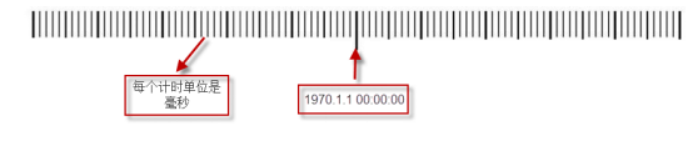
在计算机中定义了一把“尺子”,这把尺子是衡量时间的标准,其中以1970年1月1日0时0分0秒为基准,往右边每一个刻度都是1毫秒,这就是时间戳
1 2 3 4 5 6 7 8 9 package com.leo.date;public class Demo1Timestamp { public static void main (String[] args) { long timeMillis = System.currentTimeMillis(); System.out.println(timeMillis); } }
Date类 Date类是Java中表示时间的类,精确到毫秒,是一个相当历史悠久的类,因此,它内部很多方法都过时了
1 2 3 4 5 6 7 8 9 10 11 12 13 14 15 package com.leo.date;import java.util.Date;public class Demo2Date { public static void main (String[] args) { Date d1 = new Date (); Date d2 = new Date (1685288161452L ); System.out.println(d1); System.out.println(d2); } }
Date中依然有一些方法是比较常用的
方法名
作用
boolean before(Date when)
判断此时间是否在指定时间之后
boolean after(Date when)
判断此时间是否在指定时间之前
boolean equals(Date when)
判断两个时间是否相同
long getTime()
获取当前时间对象的时间戳
void setTime(long time)
重新设置date对象的时间戳
1 2 3 4 5 6 7 8 9 10 11 12 13 14 15 16 17 18 package com.leo.date;import java.util.Date;public class Demo3Date { public static void main (String[] args) { Date d1 = new Date (); Date d2 = new Date (1685288161452L ); System.out.println(d1.before(d2)); System.out.println(d1.after(d2)); System.out.println(d1.equals(d2)); System.out.println(d1.getTime()); System.out.println(d2.getTime()); d1.setTime(1685289951652L ); System.out.println(d1); } }
计算两个日期相差的天数
1 2 3 4 5 6 7 8 9 10 11 12 13 14 15 16 17 package com.leo.date;import java.util.Date;public class Demo4Date { public static void main (String[] args) { Date d1 = new Date (1685599951652L ); Date d2 = new Date (1685288161452L ); System.out.println(d1); System.out.println(d2); long submillis = Math.abs(d1.getTime() - d2.getTime()); long day = submillis / 1000 / 60 / 60 / 24 ; System.out.println(day); } }
DateFormat类是日期的格式化类,它以与语言无关的格式化方式对日期进行解析和格式化。
public final static DateFormat getDateInstance() 得到日期的DateFormat对象
public final static DateFormat getDateTimeInstance() 得到日期时间的 DateFormat对象:
public final String format(Date date) 使用DateFormat类完成将Date对象转换成String功能:
public Date parse(String source) 使用DateFormat类完成将String转换成Date功能
1 2 3 4 5 6 7 8 9 10 11 12 13 14 15 16 17 18 19 20 21 22 23 24 25 26 27 28 29 30 31 32 33 34 35 36 37 38 package com.leo.date;import java.text.DateFormat;import java.text.ParseException;import java.util.Date;public class Demo5DateFormat { public static void main (String[] args) throws ParseException { DateFormat dateFormat = DateFormat.getDateTimeInstance(); String s = dateFormat.format(new Date ()); System.out.println("格式化:" + s); Date date = dateFormat.parse(s); System.out.println("解析:" + date); } public static void main2 (String[] args) throws ParseException { String s = "2023年5月29日" ; DateFormat dateInstance = DateFormat.getDateInstance(); Date date = dateInstance.parse(s); System.out.println(date); } public static void main1 (String[] args) { DateFormat dateFormat = DateFormat.getDateInstance(); String s = dateFormat.format(new Date ()); System.out.println(s); } }
事实上,如果DateFormat默认的格式不满足应用场景,还可以传入格式化方式。格式化方式一共有种
1 2 3 4 5 6 7 8 9 10 11 12 13 public static final int FULL = 0 ;public static final int LONG = 1 ;public static final int MEDIUM = 2 ;public static final int SHORT = 3 ;
代码演示
1 2 3 4 5 6 7 8 9 10 11 12 13 package com.leo.date;import java.text.DateFormat;import java.util.Date;public class Demo6DateFormat { public static void main (String[] args) { DateFormat format = DateFormat.getDateTimeInstance(DateFormat.SHORT, DateFormat.SHORT); String s = format.format(new Date ()); System.out.println(s); } }
该类是DateFormat的子类,因为DateFormat功能有限,无法按照我们想要的效果格式化日期对象,而SimpleDateFormat却非常强大,可以按照任意的格式对日期进行格式化。
SimpleDateFormat在创建对象时需要遵守一定的占位符规则,在进行格式化或者解析操作时,程序就会按照预定的格式进行操作。
1
2
3
4
5
6
7
8
9
10
11
12
13
14
15
16
17
18
19
20
21
22
23
24
25
26
27
28
package com.leo.date;import java.text.ParseException;import java.text.SimpleDateFormat;import java.util.Date;public class Demo7SimpleDateFormat { public static void main (String[] args) throws ParseException { String s = "1970-01-01 08:00:00" ; SimpleDateFormat format = new SimpleDateFormat ("yyyy-MM-dd HH:mm:ss" ); Date date = format.parse(s); System.out.println(date); System.out.println(date.getTime()); } public static void main1 (String[] args) { SimpleDateFormat dateFormat = new SimpleDateFormat ( "yyyy-MM-dd HH:mm:ss.SSS 今年已过去D天 今天是本月第W周 本年第w周" ); String s = dateFormat.format(new Date ()); System.out.println(s); } }
Calendar日历类 Calendar是日历类,为我们提供了日期计算的相关功能
public int get(int field) 该方法用于获取指定字段的值
Calendar.YEAR 获取年份
Calendar.MONTH 获取月份,0表示1月,1表示2月,2表示3月,…,11表示12月
Calendar.DAY_OF_MONTH 获取本月的第几天
Calendar.DAY_OF_YEAR 获取本年的第几天
Calendar.HOUR_OF_DAY 小时,24小时制
Calendar.HOUR 小时,12小时制
Calendar.MINUTE 获取分钟
Calendar.SECOND 获取秒
Calendar.MILLISECOND 获取毫秒
Calendar.DAY_OF_WEEK 获取星期几,1表示星期日,2表示星期一,…,7表示星期六
1 2 3 4 5 6 7 8 9 10 11 12 13 14 15 16 17 18 19 20 21 22 23 24 25 package com.leo.date;import java.util.Calendar;public class Demo8Calendar { public static void main (String[] args) { Calendar calendar = Calendar.getInstance(); System.out.println(calendar.getTime()); System.out.println("年份:" + calendar.get(Calendar.YEAR)); System.out.println("月份:" + calendar.get(Calendar.MONTH) + 1 ); System.out.println("本月第几天:" + calendar.get(Calendar.DAY_OF_MONTH)); System.out.println("本年第几天:" + calendar.get(Calendar.DAY_OF_YEAR)); System.out.println("星期几:" + calendar.get(Calendar.DAY_OF_WEEK)); System.out.println("小时(24小时制):" + calendar.get(Calendar.HOUR_OF_DAY)); System.out.println("小时(12小时制):" + calendar.get(Calendar.HOUR)); System.out.println("分钟:" + calendar.get(Calendar.MINUTE)); System.out.println("秒:" + calendar.get(Calendar.SECOND)); System.out.println("毫秒:" + calendar.get(Calendar.MILLISECOND)); } }
此外,我们也可以去手动设置Calendar所代表的时间
1 2 3 4 5 6 7 8 9 10 11 12 13 14 15 16 17 18 19 20 21 22 23 24 25 26 27 28 29 30 31 32 33 34 package com.leo.date;import java.util.Calendar;import java.util.Date;public class Demo9Calendar { public static void main (String[] args) { Calendar calendar = Calendar.getInstance(); calendar.set(Calendar.YEAR, 2023 ); setCalendarMonth(calendar, 3 ); calendar.set(Calendar.DAY_OF_MONTH, 2 ); calendar.set(Calendar.HOUR_OF_DAY, 10 ); calendar.set(Calendar.MINUTE, 2 ); calendar.set(Calendar.SECOND, 1 ); System.out.println(calendar.getTime()); } public static void setCalendarMonth (Calendar calendar, int month) { calendar.set(Calendar.MONTH, month-1 ); } public static void main1 (String[] args) { Date d2 = new Date (1685288161452L ); Calendar calendar = Calendar.getInstance(); calendar.setTime(d2); System.out.println(calendar.get(Calendar.MINUTE)); } }
Calendar中,get方法负责获取时间,set方法负责设置时间,setTime负责设置Date对象,getTime负责获取Date对象。如果想要进行日期的计算,这些方法以及足够了,但是不够灵活。
实际上,还有一个add方法,可以指定给某个字段add成多少
1 2 3 4 5 6 7 8 9 10 11 12 13 14 15 16 17 package com.leo.date;import java.text.SimpleDateFormat;import java.util.Calendar;import java.util.Date;public class Demo10Calendar { public static void main (String[] args) { Calendar calendar = Calendar.getInstance(); calendar.add(Calendar.YEAR, 1 ); Date date = calendar.getTime(); SimpleDateFormat format = new SimpleDateFormat ("yyyy-MM-dd" ); System.out.println(format.format(date)); } }
随堂练习
使用日期相关类实现万年历。
1 2 3 4 5 6 7 8 9 10 11 12 13 14 15 16 17 18 19 20 21 22 23 24 25 26 27 28 29 30 31 32 33 34 35 36 37 38 39 40 41 42 43 package com.leo.date.test;import java.util.Calendar;import java.util.Scanner;public class Test1 { public static void main1 (String[] args) { Calendar calendar = Calendar.getInstance(); calendar.set(Calendar.YEAR, 2020 ); calendar.set(Calendar.MONTH, 1 ); calendar.set(Calendar.DAY_OF_MONTH, 1 ); System.out.println(calendar.getActualMaximum(Calendar.DAY_OF_MONTH)); } public static void main (String[] args) { Scanner scanner = new Scanner (System.in); System.out.println("请输入年和月:" ); int year = scanner.nextInt(); int month = scanner.nextInt(); Calendar calendar = Calendar.getInstance(); calendar.set(Calendar.YEAR, year); calendar.set(Calendar.MONTH, month-1 ); calendar.set(Calendar.DAY_OF_MONTH, 1 ); int maxDay = calendar.getActualMaximum(Calendar.DAY_OF_MONTH); System.out.println("周日\t周一\t周二\t周三\t周四\t周五\t周六" ); int week = calendar.get(Calendar.DAY_OF_WEEK); int count = week - 1 ; for (int i = 0 ; i < week - 1 ; i++) { System.out.print(" \t" ); } for (int i = 1 ; i <= maxDay; i++) { System.out.print(i + "\t" ); count++; if (count == 7 ) { System.out.println(); count = 0 ; } } } }
计算一个人从出生到现在过了多少天。
1 2 3 4 5 6 7 8 9 10 11 12 13 14 15 16 17 18 19 20 21 22 23 24 package com.leo.date.test;import java.text.ParseException;import java.text.SimpleDateFormat;import java.util.Calendar;import java.util.Date;import java.util.Scanner;public class Test2 { public static void main (String[] args) throws ParseException { Scanner scanner = new Scanner (System.in); System.out.println("请输入生日(yyyy-MM-dd)" ); String s = scanner.next(); SimpleDateFormat dateFormat = new SimpleDateFormat ("yyyy-MM-dd" ); Date birth = dateFormat.parse(s); long time = System.currentTimeMillis() - birth.getTime(); long day = time / 1000 / 60 / 60 / 24 ; System.out.println(day); } }
现在有一个日期字符串,格式为2022 01 02 12 50 59,将其改成2022-01-02 12:50:59
1 2 3 4 5 6 7 8 9 10 11 12 13 14 15 16 17 18 19 20 package com.leo.date.test;import java.text.ParseException;import java.text.SimpleDateFormat;import java.util.Date;public class Test3 { public static void main (String[] args) throws ParseException { String s = "2022 01 02 12 50 59" ; SimpleDateFormat format1 = new SimpleDateFormat ("yyyy MM dd HH mm ss" ); Date date = format1.parse(s); SimpleDateFormat format2 = new SimpleDateFormat ("yyyy-MM-dd HH:mm:ss" ); String time = format2.format(date); System.out.println(time); } }
工具类 System类 与系统相关的类,可以操作一些系统相关的信息,比如输入输出流、访问外部定义的属性和环境变量等。
System类中定义了一些属性,主要是错误流、输入输出流
1 2 3 4 5 6 7 8 9 10 package com.leo.utils;public class Demo1System { public static void main (String[] args) { System.err.println("错误流" ); System.out.println("HelloWorld" ); System.err.println("错误流" ); } }
此外,System中还定义了一些方法
*方法名* *描述*
public static long currentTimeMillis()
返回当前时间(以毫秒为单位)。
Public static long nanoTime()
以纳秒为单位返回正在运行的Java虚拟机的高分辨率时间源的当前值。
public static Map<String,String> getenv()
返回当前系统环境的不可修改的字符串映射视图。
public static Properties getProperties()
获取系统参数
public static void exit(int status)
终止当前运行的Java虚拟机。
1 2 3 4 5 6 7 8 9 10 11 12 13 14 15 16 17 18 19 20 package com.leo.utils;public class Demo1System { public static void main (String[] args) { System.err.println("错误流" ); System.out.println("HelloWorld" ); System.err.println("错误流" ); long timeMillis = System.currentTimeMillis(); System.out.println(timeMillis); long nanoTime = System.nanoTime(); System.out.println(nanoTime); String home = System.getenv("JAVA_HOME" ); System.out.println(home); String property = System.getProperty("os.name" ); System.out.println(property); } }
Math Math类是数学相关的类,内部提供了一些数学常用的方法
1
2
3
4
5
6
7
8
9
10
11
12
13
14
15
16
17
18
19
20
21
22
23
24
25
26
27
28
29
30
31
package com.leo.utils;public class Demo2Math { public static void main (String[] args) { double pi = Math.PI; System.out.println(Math.ceil(3.14 )); System.out.println(Math.floor(3.55 )); System.out.println(Math.round(3.5 )); System.out.println("========" ); System.out.println(Math.max(3 ,4 )); System.out.println(Math.min(3 ,4 )); System.out.println("=======" ); System.out.println(Math.abs(-5 )); System.out.println(Math.sqrt(9 )); System.out.println(Math.pow(2 , 3 )); System.out.println("===" ); System.out.println(Math.random()); System.out.println((Math.random() * 9 ) + 1 ); } }
Random类 Random类是一个随机数的类,使用起来比Math的random类更加灵活,能够生成各种伪随机数 ,是根据一定的算法生成的,也就是有规律的随机。
在使用Random类时,需要传入一个种子数,在这个种子数基础上进行一系列的变化,从而生成需要的随机数值。
*方法名* *描述*
public Random()
创建一个新的随机数生成器。
public Random(long seed)
使用单个long种子创建一个新的随机数生成器。
1 2 3 4 5 6 7 8 9 10 11 12 13 14 15 16 17 18 19 20 21 22 23 24 25 26 27 package com.leo.utils;import java.util.Random;public class Demo3Random { public static void main (String[] args) { Random random = new Random (); System.out.println(random.nextDouble()); System.out.println(random.nextInt()); System.out.println(random.nextInt(10 )); System.out.println(random.nextBoolean()); } public static void main1 (String[] args) { Random random1 = new Random (20 ); Random random2 = new Random (20 ); for (int i = 0 ; i < 10 ; i++) { System.out.println(random1.nextDouble()+":" +random2.nextDouble()); } } }
UUID UUID是通用唯一识别码,是一种软件构建的标准,目的是让分布式系统中所有元素都有唯一的便是信息,不需要通过中央控制端来辨识信息的指定。它是由一组32位的16进制数字所构成
1 2 3 4 5 6 7 8 9 10 11 12 package com.leo.utils;import java.util.UUID;public class Demo4UUID { public static void main (String[] args) { UUID uuid = UUID.randomUUID(); System.out.println(uuid.toString()); System.out.println(UUID.randomUUID().toString()); } }
枚举类 Java中没有真正的枚举,枚举本质上是一个类。是Java5新增的特性,允许使用常量来表示特定的数据片段,而且全部都是安全的类型。
说白了,枚举的作用就是来表示某些有特定取值范围的字段,比如一周有七天,性别有两种
语法
1 2 3 修饰符 enum 枚举名 { 枚举值1 , 枚举值2 , 枚举值3 ; }
枚举本质上是一个类,所以其中也可以定义变量,但是建议定义成final修饰的常量。枚举类中也可以定义方法
定义了变量的枚举一般写法如下
1 2 3 4 5 6 7 8 9 10 修饰符 enum 枚举名 { 枚举值1 (参数1 , 参数2 ), 枚举值2 (参数1 , 参数2 ), 枚举值3 (参数1 , 参数2 ); final 数据类型 变量名1 ; final 数据类型 变量名2 ; 枚举名(数据类型 形参1 , 数据类型 形参2 ) { this .变量名1 = 形参1 ; this .变量名2 = 形参2 ; } get方法 }
枚举值的命名规则与常量一致
1 2 3 4 5 6 package com.leo.enums;public enum Season { SPRING, SUMMER, AUTUMN, WINDER; }
带有成员变量的枚举类
1 2 3 4 5 6 7 8 9 10 11 12 13 14 15 16 17 18 19 20 21 22 23 24 package com.leo.enums;public enum ErrorCodeEnum { SUCCESS(200 , "成功" ), ERROR(400 , "失败" ), NOT_FOUND(404 , "资源未找到" ) ; private final Integer code; private final String msg; ErrorCodeEnum(Integer code, String msg) { this .code = code; this .msg = msg; } public Integer getCode () { return code; } public String getMsg () { return msg; } }
枚举的语法尽管和类不一样,但是本质上底层还是个class,所以枚举隐性的继承了Object类,这里不是直接继承,而是先继承了Enum类,Enum类继承了Object。
枚举类中的枚举值都是publis static final修饰的常量,这些常量的类型就是枚举的类型。
枚举类一般应用于取值有范围、有限的场景,比如季节有4个,一年12个月,系统中的错误码等等等
1 2 3 4 5 6 7 8 9 10 11 12 13 14 15 16 17 18 19 20 21 22 package com.leo.enums;public class LeoException extends RuntimeException { private Integer code; private String msg; public LeoException (ErrorCodeEnum codeEnum) { this .code = codeEnum.getCode(); this .msg = codeEnum.getMsg(); } public Integer getCode () { return code; } public String getMsg () { return msg; } }
下面再以性别为例
1 2 3 4 5 6 7 package com.leo.enums;public enum SexEnum { MAN, WOMAN }
之后可以将这个枚举类作为一个成员变量的类型来使用
1 2 3 4 5 6 7 8 9 10 11 12 13 14 15 16 17 18 19 20 21 22 23 24 package com.leo.enums;public class Person { private String name; private SexEnum sex; public String getName () { return name; } public void setName (String name) { this .name = name; } public SexEnum getSex () { return sex; } public void setSex (SexEnum sex) { this .sex = sex; } }
之后的使用与普通的类无异,只不过枚举类不可以new对象。
1 2 3 4 5 6 7 8 9 10 11 12 13 14 15 16 17 18 19 20 package com.leo.enums;import java.util.Arrays;public class Demo1Enum { public static void main (String[] args) { Person person = new Person (); person.setName("张三" ); person.setSex(SexEnum.MAN); System.out.println(person.getSex()); SexEnum[] values = SexEnum.values(); System.out.println(Arrays.toString(values)); System.out.println(SexEnum.valueOf("MAN" )); System.out.println(SexEnum.MAN.name()); } }
回想枚举类的应用场景,是用来表示取值有限、有范围的字段,这个场景就有可能出现中文,因此有的企业对于枚举类开了一个特
例:允许枚举值使用中文来表示,这也是开发规范中唯一一个允许使用中文表示的场景
随堂练习
根据交通信号灯颜色决定汽车停车、行驶和慢行
1 2 3 4 5 6 7 8 9 10 11 12 13 14 15 16 17 18 19 20 21 22 23 24 25 26 27 28 package com.leo.enums.test;public enum LightEnum { GREEN("行驶" ), RED("停车" ), YELLOW("减速" ) ; private final String msg; LightEnum(String msg) { this .msg = msg; } public String getMsg () { return msg; } } package com.leo.enums.test;public class Test1 { public static void main (String[] args) { System.out.println(LightEnum.GREEN.getMsg()); System.out.println(LightEnum.RED.getMsg()); System.out.println(LightEnum.YELLOW.getMsg()); } }
定义一个支付方式枚举,每一种支付方式拥有特定的优惠金额。编写一个方法,根据支付方式获取优惠金额,若支付方式不存在,则优惠金额为0。
1 2 3 4 5 6 7 8 9 10 11 12 13 14 15 16 17 18 19 20 21 22 23 24 25 26 27 28 29 30 31 32 33 34 35 36 37 38 39 40 41 42 43 44 45 package com.leo.enums.test;import java.math.BigDecimal;public enum PayTypeEnum { ALIPAY(new BigDecimal (1 )), WXPAY(new BigDecimal ("0.9" )) ; private final BigDecimal price; PayTypeEnum(BigDecimal price) { this .price = price; } public static BigDecimal getPriceByName (String name) { PayTypeEnum[] values = PayTypeEnum.values(); for (PayTypeEnum value : values) { if (value.name().equals(name)) { return value.getPrice(); } } return BigDecimal.ZERO; } public BigDecimal getPrice () { return price; } } package com.leo.enums.test;public class Test2 { public static void main (String[] args) { System.out.println(PayTypeEnum.getPriceByName("ALIPAY" )); System.out.println(PayTypeEnum.getPriceByName("WXPAY" )); System.out.println(PayTypeEnum.getPriceByName("YINLIAN" )); } }
File类 File类概述 File类代表文件和目录,在开发中想要操作文件,就需要用到file类,在后面学习IO流也很常用
File类常用的构造方法需要传入一个路径,这个路径可以是相对路径也可以是绝对路径。
*构造方法* *描述*
public File(String pathname)
通过将给定路径名字符串转换为抽象路径名来创建一个新File实例
public File(File parent, String child)
根据parent抽象路径名和child路径名字符串创建一个新File实例
public File(String parent, String child)
根据parent路径名字符串和child路径名字符串创建一个新File实例
相对路径:文件相对于某个路径下的路径,默认是user.dir的路径,在IDEA中就是项目根路径
绝对路径:文件在磁盘上的距离。
1 2 3 4 5 6 7 8 9 10 11 package com.leo.file;import java.io.File;public class Demo1File { public static void main (String[] args) { File f1 = new File ("file/abc.txt" ); File f2 = new File ("D:\\【雷欧教育】\\01-第一阶段-Java基础【雷欧教育】\\04-代码\\第08章_常用工具类\\MyProject\\file\\abc.txt" ); } }
File类的获取功能
*方法名* *描述*
public String getName()
返回由此抽象路径名表示的文件或目录的名称。
public String getPath()
返回此抽象路径名的绝对形式(绝对路径或相对路径)。
public String getAbsolutePath()
返回此抽象路径名的绝对形式(绝对路径)。
public long lastModified()
返回此抽象路径名表示的文件最后一次被修改的时间。
public long length()
返回由此抽象路径名表示的文件的长度。
代码演示
1 2 3 4 5 6 7 8 9 10 11 12 13 14 15 16 17 package com.leo.file;import java.io.File;public class Demo2File { public static void main (String[] args) { File f1 = new File ("file/abc.txt" ); System.out.println(f1.getName()); System.out.println(f1.getPath()); System.out.println(f1.getAbsolutePath()); System.out.println(f1.length()); System.out.println(f1.lastModified()); File f2 = new File ("D:\\【雷欧教育】\\01-第一阶段-Java基础【雷欧教育】\\04-代码\\第08章_常用工具类\\MyProject\\file\\abc.txt" ); System.out.println(f2.getPath()); } }
注意点:在UTF-8编码下,英文、数字、非中文符号每一个都占1个字节,而中文绝大多数都占3个字节,个别占4字节,而GBK编码下,中文字符占2字节,非中文字符占1字节
File类的判断功能
*方法名* *描述*
public boolean exists()
测试此抽象路径名表示的文件或目录是否存在。
public boolean isDirectory()
测试此抽象路径名表示的文件是否是一个目录。
public boolean isFile()
测试此抽象路径名表示的文件是否是一个标准文件。
public boolean isHidden()
测试此抽象路径名指定的文件是否是一个隐藏文件。
public boolean canRead()
测试应用程序是否可以读取此抽象路径名表示的文件。
public boolean canWrite()
测试应用程序是否可以修改此抽象路径名表示的文件。
代码演示
1 2 3 4 5 6 7 8 9 10 11 12 13 14 15 16 17 18 package com.leo.file;import java.io.File;public class Demo3File { public static void main (String[] args) { File f1 = new File ("file/abc.txt" ); File f2 = new File ("file/def.txt" ); File f3 = new File ("file" ); System.out.println(f1.exists() + ":" + f2.exists()); System.out.println(f1.isDirectory() + ":" + f3.isDirectory()); System.out.println(f1.isFile() + ":" + f3.isFile()); System.out.println(f1.isHidden() + ":" + f3.isHidden()); System.out.println(f1.canRead() + ":" + f3.canRead()); System.out.println(f1.canWrite() + ":" + f3.canWrite()); } }
File类的其他方法
*方法名* *描述*
public boolean mkdir()
创建此抽象路径名指定的目录。
public boolean mkdirs()
创建此抽象路径名指定的目录,包括所有必需但不存在的父目录。
public boolean createNewFile()
当且仅当不存在具有此抽象路径名指定名称的文件时,不可分地创建一个新的空文件。
public boolean delete()
删除此抽象路径名表示的文件或目录。
public boolean renameTo(File dest)
移动文件,并对移动后的文件重新命名。
public String[] list()
返回一个字符串数组,这些字符串指定此抽象路径名表示的目录中的文件和目录。
public File[] listFiles()
返回一个抽象路径名数组,这些路径名表示此抽象路径名表示的目录中的文件。
代码演示
1 2 3 4 5 6 7 8 9 10 11 12 13 14 15 16 17 18 19 20 21 22 23 24 25 26 27 package com.leo.file;import java.io.File;import java.io.IOException;public class Demo4File { public static void main (String[] args) throws IOException { File file = new File ("D:\\【雷欧教育】\\01-第一阶段-Java基础【雷欧教育】\\04-代码\\第08章_常用工具类\\MyProject\\src\\com\\leo\\enums" ); File[] files = file.listFiles(); for (File f : files) { System.out.println(f.getAbsolutePath()); } } }
File类的过滤器 File类的listFiles有两个重载方法,可以接受两种过滤器
第一个重载方法接受一个 FilenameFilter,可以去按照文件名进行过滤
1 2 3 4 5 6 7 8 9 10 11 12 13 14 15 16 17 18 19 20 package com.leo.file;import java.io.File;import java.io.FilenameFilter;public class Demo5File { public static void main (String[] args) { File file = new File ("D:\\【雷欧教育】\\01-第一阶段-Java基础【雷欧教育】\\03-软件" ); File[] files = file.listFiles(new FilenameFilter () { @Override public boolean accept (File dir, String name) { return name.endsWith(".exe" ); } }); for (File f : files) { System.out.println(f.getName()); } } }
另一个重载方法接收一个 FileFilter,可以按照文件进行过滤
1 2 3 4 5 6 7 8 9 10 11 12 13 14 15 16 17 18 19 20 21 package com.leo.file;import java.io.File;import java.io.FileFilter;import java.io.FilenameFilter;public class Demo6File { public static void main (String[] args) { File file = new File ("D:\\【雷欧教育】\\01-第一阶段-Java基础【雷欧教育】\\03-软件" ); File[] files = file.listFiles(new FileFilter () { @Override public boolean accept (File pathname) { return pathname.isFile() && pathname.getName().endsWith(".exe" ); } }); for (File f : files) { System.out.println(f.getName()); } } }
递归 什么是递归 递归就是指在方法调用过程中,方法直接或间接地调用自己的过程。
递归的使用 递归可以解决很多复杂的问题 ,但是使用过程中一定要注意两点
定义递归头,即在什么情况下不再进行递归调用(递归的停止条件),否则会陷入死递归,导致栈内存移出
定义递归体,即什么情况下再去调用自身
比如下面的代码就是典型的递归使用错误,会出现栈内存移出
1 2 3 4 5 6 7 8 9 10 11 12 13 package com.leo.recursion;public class Demo1 { public static void main (String[] args) { method(); } public static void method () { method(); } }
即便不出现死递归,递归的层数太多也会出现栈内存溢出,所以在使用递归时也需要注意不要递归太多层数。
随堂练习
计算n的阶乘(用循环做是最简单的)。
1 2 3 4 5 6 7 8 9 10 11 12 13 14 15 16 17 18 19 20 21 22 23 24 25 26 27 package com.leo.recursion.test;import java.util.Scanner;public class Test1 { public static void main (String[] args) { Scanner scanner = new Scanner (System.in); System.out.println("请输入要计算的阶乘数" ); int n = scanner.nextInt(); System.out.println(method(n)); } public static int method (int n) { if (n == 1 ) { return 1 ; } return n * method(n-1 ); } }
假如有一对兔子,从出生后第3个月起每个月都生一对兔子,小兔子长到第三个月后每个月又生一对兔子,假如兔子都不死,请问第n个月后的兔子有多少对?(兔子问题、斐波那契数列)
1 2 3 4 5 6 7 8 9 10 11 12 13 14 15 16 17 18 19 20 21 22 23 24 25 26 27 28 29 30 31 32 33 34 35 36 37 38 package com.leo.recursion.test;public class Test2 { public static void main (String[] args) { System.out.println(getCount(10 )); } public static int getCount (int n) { if (n == 1 || n == 2 ) { return 1 ; } return getCount(n-1 ) + getCount(n-2 ); } }
递归在使用时程序非常简单,但麻烦的地方在于找规律,只要规律找到了,写程序很简单。
递归的性能是很差,因此如果循环能解决问题,就用循环,否则再考虑递归
递归目录和文件 遍历某个文件夹下所有的目录和文件
1 2 3 4 5 6 7 8 9 10 11 12 13 14 15 16 17 18 19 20 21 22 23 24 25 26 27 28 29 30 package com.leo.recursion;import java.io.File;public class Demo2 { public static void main (String[] args) { File file = new File ("D:\\【雷欧教育】\\01-第一阶段-Java基础【雷欧教育】\\04-代码\\第08章_常用工具类\\MyProject\\src\\com\\leo" ); printFile(file, 0 ); } public static void printFile (File file, int level) { for (int i = 0 ; i < level; i++) { System.out.print("-" ); } System.out.println(file.getName()); if (file.isDirectory()) { File[] files = file.listFiles(); for (File f : files) { printFile(f, level+1 ); } } } }
商品管理系统 学习目标
掌握数组的作用
熟练使用分层开发
掌握常用工具类的使用
巩固封装思想,能够独立封装一个容器类
掌握数据隔离的基本思路,实现不同用户查看不同数据
项目需求
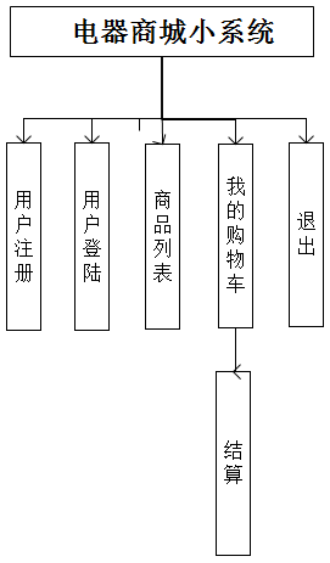
需求分析 从上图得知,系统中有三类数据:用户、商品、购物车,因此要创建3个实体类,每个实体类都有一个Service层,Dao层
需要创建的类
实体类:User、Product、Cart
视图层:ProductManager
业务层:UserService、ProductService、CartService
持久层:UserDao、ProductDao、CartDao
数据库:DataBase
工具类:ArrayCollection,IdUtil
逻辑细节
关于容器类,容器类是对数组的二次封装,需要能够往容器里添加数据,可以动态的对容器容量进行扩容
关于数据的唯一标识:创建一个ID工具类,工具类中有三种ID生成策略:自增、时间戳、UUID
关于数据隔离:购物车中的数据需要加一个创建人字段,当查看当前登录人的购物车时,需要根据创建人过滤数据
关于登录状态:记录一下当前登录的人是谁(保存到某个位置)
其余小要求:实体类中所有的基本数据类型全部换成引用数据类型,所有的浮点数全部换成BigDecimal
类创建 实体类 User
1 2 3 4 5 6 7 8 9 10 11 12 13 14 15 16 17 18 19 20 21 22 23 24 25 26 27 28 29 30 31 32 33 34 35 package com.leo.product.pojo;public class User { private String id; private String username; private String password; public String getId () { return id; } public void setId (String id) { this .id = id; } public String getUsername () { return username; } public void setUsername (String username) { this .username = username; } public String getPassword () { return password; } public void setPassword (String password) { this .password = password; } }
Product
1 2 3 4 5 6 7 8 9 10 11 12 13 14 15 16 17 18 19 20 21 22 23 24 25 26 27 28 29 30 31 32 33 34 35 36 37 38 39 40 41 42 43 44 45 46 package com.leo.product.pojo;import java.math.BigDecimal;public class Product { private Integer id; private String name; private BigDecimal price; private Integer stock; public Integer getId () { return id; } public void setId (Integer id) { this .id = id; } public String getName () { return name; } public void setName (String name) { this .name = name; } public BigDecimal getPrice () { return price; } public void setPrice (BigDecimal price) { this .price = price; } public Integer getStock () { return stock; } public void setStock (Integer stock) { this .stock = stock; } }
Cart
1 2 3 4 5 6 7 8 9 10 11 12 13 14 15 16 17 18 19 20 21 22 23 24 25 26 27 28 29 30 31 32 33 34 35 36 37 38 39 40 41 42 43 44 45 46 47 package com.leo.product.pojo;public class Cart { private Long id; private Product product; private Integer count; private String createUser; public Long getId () { return id; } public void setId (Long id) { this .id = id; } public Product getProduct () { return product; } public void setProduct (Product product) { this .product = product; } public Integer getCount () { return count; } public void setCount (Integer count) { this .count = count; } public String getCreateUser () { return createUser; } public void setCreateUser (String createUser) { this .createUser = createUser; } }
异常类 1 2 3 4 5 6 7 8 9 10 11 12 13 14 15 16 17 18 19 20 package com.leo.exception;public class ProductException extends RuntimeException { private Integer code; private String msg; public ProductException (Integer code, String msg) { this .code = code; this .msg = msg; } public Integer getCode () { return code; } public String getMsg () { return msg; } }
状态码枚举 1 2 3 4 5 6 7 8 9 10 11 12 13 14 15 16 17 18 19 20 21 22 23 24 25 26 package com.leo.product.enums;public enum ErrorCodeEnum { USER_EXISTS(40001 , "用户已存在" ), USER_NOT_FOUND_EXCEPTION(40002 , "用户名或密码错误" ), PASSWORD_FAIL(40003 , "用户名或密码错误" ), ; private final Integer code; private final String msg; ErrorCodeEnum(Integer code, String msg) { this .code = code; this .msg = msg; } public Integer getCode () { return code; } public String getMsg () { return msg; } }
视图层 1 2 3 4 5 6 7 8 9 10 11 12 13 14 15 16 17 18 19 20 21 22 23 24 25 26 27 28 29 30 31 32 33 34 35 36 37 38 39 40 41 42 43 44 package com.leo.product.view;import java.util.Scanner;public class ProductManager { private static final Scanner SCANNER = new Scanner (System.in); public static void main (String[] args) { while (true ) { showMenu(); checkMenu(); } } public static void checkMenu () { System.out.println("请选择菜单:" ); int menu = SCANNER.nextInt(); if (menu == 1 ) { System.out.println("商品列表" ); }else if (menu == 2 ) { System.out.println("我的购物车" ); }else if (menu == 3 ) { System.out.println("个人信息" ); }else if (menu == 4 ) { System.out.println("添加购物车" ); }else { System.out.println("退出登录" ); } } public static void showMenu () { System.out.println("******欢迎进入京北商城******" ); System.out.println(" 1.商品列表" ); System.out.println(" 2.我的购物车" ); System.out.println(" 3.个人信息" ); System.out.println(" 4.添加购物车" ); System.out.println(" 5.退出登录" ); System.out.println("*************************" ); } }
业务层 创建UserService、UserServiceImpl、ProductService、ProductServiceImpl、CartService、CartServiceImpl
持久层 创建UserDao、ProductDao、CartDao
工具类 IdUtil
IdUtil是Id生成策略工具类,在开发中一般要满足各种情况下的ID生成规则,所以在里面需要定义至少三种策略:UUID、时间戳、自增
1 2 3 4 5 6 7 8 9 10 11 12 13 14 15 16 17 18 19 20 21 22 23 24 package com.leo.product.utils;import java.util.UUID;public final class IdUtil { private IdUtil () {} public static String getUuid () { return UUID.randomUUID().toString().replace("-" , "" ); } public static Long getTimeId () { return System.currentTimeMillis(); } private static int CURRENT_ID = 1 ; public static Integer getIncrId () { return CURRENT_ID++; } }
ArrayCollection
ArrayCollection是一个容器类,负责存储数据,是对数组的二次封装。
类内部有一个数组用来存储数据,数组长度是4
当数据量超过数组长度时,需要对数组进行扩容,扩容成原来的1.5倍
对于“获取元素个数”的方法,调用时应当是获取容器中存储的数据个数,而不是数组长度
对于获取所有方法,需要获取到数组中所有的元素,没有存储数据的位置不需要获取。
1 2 3 4 5 6 7 8 9 10 11 12 13 14 15 16 17 18 19 20 21 22 23 24 25 26 27 28 29 30 31 32 33 34 35 36 37 38 39 40 41 42 43 44 45 46 47 48 49 50 package com.leo.product.utils;public class ArrayCollection { private Object[] data = new Object [4 ]; private int size = 0 ; public void add (Object e) { if (size == data.length) { Object[] arr = new Object [(int ) Math.max(data.length * 1.5 , 2 )]; System.arraycopy(data, 0 , arr, 0 , size); data = arr; } data[size] = e; size++; } public Object[] getAllData() { Object[] dataArr = new Object [size]; System.arraycopy(data, 0 , dataArr, 0 , size); return dataArr; } public void clearData () { data = new Object [data.length]; size = 0 ; } public int length () { return size; } }
数据库初始化 1 2 3 4 5 6 7 8 9 10 11 12 13 14 15 16 17 18 19 20 21 22 23 24 25 26 package com.leo.product.db;import com.leo.product.pojo.Product;import com.leo.product.utils.ArrayCollection;import java.math.BigDecimal;public class Database { public static ArrayCollection users = new ArrayCollection (); public static ArrayCollection products = new ArrayCollection (); public static ArrayCollection carts = new ArrayCollection (); static { products.add(new Product (10101 , "海尔冰箱" , new BigDecimal ("3999.9" ), 50 )); products.add(new Product (10102 , "格力冰箱" , new BigDecimal ("2888.8" ), 30 )); products.add(new Product (10103 , "TCL冰箱" , new BigDecimal ("1999.8" ), 100 )); products.add(new Product (10104 , "美的冰箱" , new BigDecimal ("4999.9" ), 60 )); products.add(new Product (10201 , "海尔空调" , new BigDecimal ("3099.9" ), 50 )); products.add(new Product (10202 , "格力空调" , new BigDecimal ("2808.8" ), 40 )); products.add(new Product (10203 , "TCL空调" , new BigDecimal ("1099.8" ), 120 )); products.add(new Product (10204 , "美的空调" , new BigDecimal ("4909.9" ), 65 )); } }
功能编写 商品列表
从数据库中查询出所有的商品(持久层,但是需要使用业务层去调用)
展示在页面中(视图层)
ProductManager
1 2 3 4 5 6 7 8 9 10 11 12 13 14 15 16 17 18 19 20 public static void checkMenu () { System.out.println("请选择菜单:" ); int menu = SCANNER.nextInt(); if (menu == 1 ) { Product[] productList = productService.getList(); System.out.println("商品编号\t\t商品名称\t\t商品价格\t\t商品库存" ); for (Product product : productList) { System.out.println(product.getId()+"\t\t" +product.getName()+ "\t\t" +product.getPrice()+"\t\t" +product.getStock()); } }else if (menu == 2 ) { System.out.println("我的购物车" ); }else if (menu == 3 ) { System.out.println("个人信息" ); }else if (menu == 4 ) { System.out.println("添加购物车" ); }else { System.out.println("退出登录" ); } }
ProductService
1 2 3 4 5 Product[] getList();
ProductServiceImpl
1 2 3 4 @Override public Product[] getList() { return productDao.getList(); }
ProductDao
1 2 3 4 5 6 7 8 9 10 11 12 public Product[] getList() { Object[] objArr = Database.products.getAllData(); Product[] products = new Product [objArr.length]; for (int i = 0 ; i < objArr.length; i++) { products[i] = (Product) objArr[i]; } return products; }
注册 因为购物车需要区分每个用户的购物车,实现数据隔离,所以需要实现出一套用户体系,至少要有注册登录功能。在没有登录的时候,显示注册和登录菜单,在登录后,显示功能菜单
提醒用户输入用户名和密码(视图层)
查询用户是否存在(业务层、持久层)
如果存在,提醒用户已存在(业务层)
如果不存在,保存到用户容器中(业务层、)持久层
提示注册成功(视图层)
重新显示菜单(视图层)
ProductManager
1 2 3 4 5 6 7 8 9 10 11 12 13 14 15 16 17 18 19 20 21 22 23 24 25 26 27 28 29 30 31 32 33 34 35 36 37 38 39 40 41 42 43 44 45 46 47 48 49 50 51 52 53 54 55 56 57 58 59 60 61 62 63 64 65 66 67 68 69 70 71 72 73 74 75 76 77 78 79 80 81 82 83 84 85 86 87 88 89 90 91 92 package com.leo.product.view;import com.leo.product.exception.ProductException;import com.leo.product.pojo.Product;import com.leo.product.service.ProductService;import com.leo.product.service.UserService;import com.leo.product.service.impl.ProductServiceImpl;import com.leo.product.service.impl.UserServiceImpl;import java.util.Scanner;public class ProductManager { private static final Scanner SCANNER = new Scanner (System.in); private static ProductService productService = new ProductServiceImpl (); private static UserService userService = new UserServiceImpl (); private static boolean login = false ; public static void main (String[] args) { while (true ) { if (login) { showMenu(); checkMenu(); }else { showLoginMenu(); checkLoginMenu(); } } } public static void showLoginMenu () { System.out.println("******欢迎进入京北商城******" ); System.out.println(" 1.登录" ); System.out.println(" 2.注册" ); System.out.println("*************************" ); } public static void checkLoginMenu () { System.out.println("请选择菜单:" ); int menu = SCANNER.nextInt(); if (menu == 1 ) { login = true ; }else if (menu == 2 ) { System.out.println("请输入用户名:" ); String username = SCANNER.next(); System.out.println("请输入密码:" ); String password = SCANNER.next(); try { userService.register(username, password); System.out.println("注册成功" ); }catch (ProductException e) { System.out.println(e.getMsg()); } } } public static void checkMenu () { System.out.println("请选择菜单:" ); int menu = SCANNER.nextInt(); if (menu == 1 ) { Product[] productList = productService.getList(); System.out.println("商品编号\t\t商品名称\t\t商品价格\t\t商品库存" ); for (Product product : productList) { System.out.println(product.getId()+"\t\t" +product.getName()+ "\t\t" +product.getPrice()+"\t\t" +product.getStock()); } }else if (menu == 2 ) { System.out.println("我的购物车" ); }else if (menu == 3 ) { System.out.println("个人信息" ); }else if (menu == 4 ) { System.out.println("添加购物车" ); }else { login = false ; } } public static void showMenu () { System.out.println("******欢迎进入京北商城******" ); System.out.println(" 1.商品列表" ); System.out.println(" 2.我的购物车" ); System.out.println(" 3.个人信息" ); System.out.println(" 4.添加购物车" ); System.out.println(" 5.退出登录" ); System.out.println("*************************" ); } }
UserService
1 2 3 4 5 6 7 8 9 10 11 12 package com.leo.product.service;public interface UserService { void register (String username, String password) ; }
UserServiceImpl
1 2 3 4 5 6 7 8 9 10 11 12 13 14 15 16 17 18 19 20 21 22 23 24 25 package com.leo.product.service.impl;import com.leo.product.dao.UserDao;import com.leo.product.enums.ErrorCodeEnum;import com.leo.product.exception.ProductException;import com.leo.product.pojo.User;import com.leo.product.service.UserService;public class UserServiceImpl implements UserService { private UserDao userDao = new UserDao (); @Override public void register (String username, String password) { User user = userDao.getByUsername(username); if (user != null ) { throw new ProductException (ErrorCodeEnum.USER_EXISTS.getCode(), ErrorCodeEnum.USER_EXISTS.getMsg()); } userDao.save(username, password); } }
UserDao
1 2 3 4 5 6 7 8 9 10 11 12 13 14 15 16 17 18 19 20 21 22 23 24 25 26 27 28 29 30 31 32 33 34 35 36 37 38 39 package com.leo.product.dao;import com.leo.product.db.Database;import com.leo.product.pojo.User;import com.leo.product.utils.IdUtil;import javax.xml.crypto.Data;public class UserDao { public User getByUsername (String username) { Object[] allData = Database.users.getAllData(); for (Object data : allData) { User u = (User) data; if (username.equals(u.getUsername())) { return u; } } return null ; } public void save (String username, String password) { User user = new User (); user.setId(IdUtil.getUuid()); user.setUsername(username); user.setPassword(password); Database.users.add(user); } }
登录
提醒用户输入用户名和密码(视图层)
查询用户是否存在(业务层、持久层)
如果不存在,提示用户名或密码错误(业务层)
如果存在,登录成功(视图层)
记录登录状态(视图层)
ProductManager
1 2 3 4 5 6 7 8 9 10 11 12 13 14 15 16 17 18 19 20 21 22 23 24 25 26 27 28 29 30 31 32 33 34 35 36 37 38 39 40 41 42 43 44 45 46 47 48 49 50 51 52 53 54 55 56 57 58 59 60 61 62 63 64 65 66 67 68 69 70 71 72 73 74 75 76 77 78 79 80 81 82 83 84 85 86 87 88 89 90 91 92 93 94 95 96 97 98 99 100 101 102 103 104 105 package com.leo.product.view;import com.leo.product.exception.ProductException;import com.leo.product.pojo.Product;import com.leo.product.pojo.User;import com.leo.product.service.ProductService;import com.leo.product.service.UserService;import com.leo.product.service.impl.ProductServiceImpl;import com.leo.product.service.impl.UserServiceImpl;import java.util.Scanner;public class ProductManager { private static final Scanner SCANNER = new Scanner (System.in); private static ProductService productService = new ProductServiceImpl (); private static UserService userService = new UserServiceImpl (); private static boolean login = false ; private static User currentLogin = null ; public static void main (String[] args) { while (true ) { if (login) { showMenu(); checkMenu(); }else { showLoginMenu(); checkLoginMenu(); } } } public static void showLoginMenu () { System.out.println("******欢迎进入京北商城******" ); System.out.println(" 1.登录" ); System.out.println(" 2.注册" ); System.out.println("*************************" ); } public static void checkLoginMenu () { System.out.println("请选择菜单:" ); int menu = SCANNER.nextInt(); if (menu == 1 ) { System.out.println("请输入用户名:" ); String username = SCANNER.next(); System.out.println("请输入密码:" ); String password = SCANNER.next(); try { User user = userService.login(username, password); System.out.println("登录成功" ); currentLogin = user; login = true ; }catch (ProductException e) { System.out.println(e.getMsg()); } }else if (menu == 2 ) { System.out.println("请输入用户名:" ); String username = SCANNER.next(); System.out.println("请输入密码:" ); String password = SCANNER.next(); try { userService.register(username, password); System.out.println("注册成功" ); }catch (ProductException e) { System.out.println(e.getMsg()); } } } public static void checkMenu () { System.out.println("请选择菜单:" ); int menu = SCANNER.nextInt(); if (menu == 1 ) { Product[] productList = productService.getList(); System.out.println("商品编号\t\t商品名称\t\t商品价格\t\t商品库存" ); for (Product product : productList) { System.out.println(product.getId()+"\t\t" +product.getName()+ "\t\t" +product.getPrice()+"\t\t" +product.getStock()); } }else if (menu == 2 ) { System.out.println("我的购物车" ); }else if (menu == 3 ) { System.out.println("个人信息" ); }else if (menu == 4 ) { System.out.println("添加购物车" ); }else { login = false ; } } public static void showMenu () { System.out.println("******欢迎进入京北商城******" ); System.out.println(" 1.商品列表" ); System.out.println(" 2.我的购物车" ); System.out.println(" 3.个人信息" ); System.out.println(" 4.添加购物车" ); System.out.println(" 5.退出登录" ); System.out.println("*************************" ); } }
UserService
1 2 3 4 5 6 User login (String username, String password) ;
UserServiceImpl
1 2 3 4 5 6 7 8 9 10 11 12 13 14 @Override public User login (String username, String password) { User user = userDao.getByUsername(username); if (user == null ) { throw new ProductException (ErrorCodeEnum.USER_NOT_FOUND_EXCEPTION.getCode(), ErrorCodeEnum.USER_NOT_FOUND_EXCEPTION.getMsg()); } if (!user.getPassword().equals(password)) { throw new ProductException (ErrorCodeEnum.PASSWORD_FAIL.getCode(), ErrorCodeEnum.PASSWORD_FAIL.getMsg()); } return user; }
个人信息 直接展示当前登录人
ProductManager
1 2 3 4 5 6 7 8 9 10 11 12 13 14 15 16 17 18 19 20 21 public static void checkMenu () { System.out.println("请选择菜单:" ); int menu = SCANNER.nextInt(); if (menu == 1 ) { Product[] productList = productService.getList(); System.out.println("商品编号\t\t商品名称\t\t商品价格\t\t商品库存" ); for (Product product : productList) { System.out.println(product.getId()+"\t\t" +product.getName()+ "\t\t" +product.getPrice()+"\t\t" +product.getStock()); } }else if (menu == 2 ) { System.out.println("我的购物车" ); }else if (menu == 3 ) { System.out.println("ID:" + currentLogin.getId()); System.out.println("username:" + currentLogin.getUsername()); }else if (menu == 4 ) { System.out.println("添加购物车" ); }else { login = false ; } }
退出登录 清除当前登录人、修改登录状态
ProductManager
1 2 3 4 5 6 7 8 9 10 11 12 13 14 15 16 17 18 19 20 21 22 23 public static void checkMenu () { System.out.println("请选择菜单:" ); int menu = SCANNER.nextInt(); if (menu == 1 ) { Product[] productList = productService.getList(); System.out.println("商品编号\t\t商品名称\t\t商品价格\t\t商品库存" ); for (Product product : productList) { System.out.println(product.getId()+"\t\t" +product.getName()+ "\t\t" +product.getPrice()+"\t\t" +product.getStock()); } }else if (menu == 2 ) { System.out.println("我的购物车" ); }else if (menu == 3 ) { System.out.println("ID:" + currentLogin.getId()); System.out.println("username:" + currentLogin.getUsername()); }else if (menu == 4 ) { System.out.println("添加购物车" ); }else { System.out.println("退出成功" ); currentLogin = null ; login = false ; } }
添加购物车
展示商品列表(视图层)
提醒用户选择产品(视图层)
提醒用户加入数量(视图层)
查询商品在购物车中是否已存在(业务层)
如果存在,只增加数量(业务层)
如果不存在,添加购物车(业务层)
提示加入成功(视图层)
ProductManager
1 2 3 4 5 6 7 8 9 10 11 12 13 14 15 16 17 18 19 20 21 22 23 24 public static void checkMenu () { System.out.println("请选择菜单:" ); int menu = SCANNER.nextInt(); if (menu == 1 ) { showProductList(); }else if (menu == 2 ) { System.out.println("我的购物车" ); }else if (menu == 3 ) { System.out.println("ID:" + currentLogin.getId()); System.out.println("username:" + currentLogin.getUsername()); }else if (menu == 4 ) { showProductList(); System.out.println("请选择加入购物车的商品:" ); int productId = SCANNER.nextInt(); System.out.println("请输入加入购物车的数量:" ); int count = SCANNER.nextInt(); cartService.addCart(productId, count); System.out.println("加入成功" ); }else { System.out.println("退出成功" ); currentLogin = null ; login = false ; } }
CartService
1 2 3 4 5 6 7 8 9 10 11 12 package com.leo.product.service;public interface CartService { void addCart (int productId, int count) ; }
CartServiceImpl
1 2 3 4 5 6 7 8 9 10 11 12 13 14 15 16 17 @Override public void addCart (int productId, int count) { Cart cart = cartDao.getByProductId(productId, ProductManager.currentLogin.getId()); if (cart != null ) { cart.setCount(cart.getCount() + count); }else { cart = new Cart (); cart.setId(IdUtil.getTimeId()); cart.setCreateUser(ProductManager.currentLogin.getId()); cart.setCount(count); Product product = productDao.getById(productId); cart.setProduct(product); cartDao.save(cart); } }
CartDao
1 2 3 4 5 6 7 8 9 10 11 12 13 14 15 public Cart getByProductId (int productId, String userId) { Object[] allData = Database.carts.getAllData(); for (Object data : allData) { Cart cart = (Cart) data; if (cart.getProduct().getId().equals(productId) && cart.getCreateUser().equals(userId)) { return cart; } } return null ; }
ProductDao
1 2 3 4 5 6 7 8 9 10 11 12 13 14 15 public Product getById (int productId) { Object[] allData = Database.products.getAllData(); for (Object data : allData) { Product product = (Product) data; if (product.getId().equals(productId)) { return product; } } return null ; }
购物车列表
查询当前登录人的购物车(业务层、持久层)
展示在页面上(视图层)
ProductManager
1 2 3 4 5 6 7 8 9 10 11 12 13 14 15 16 17 18 19 20 21 22 23 24 25 26 27 28 29 30 31 public static void checkMenu () { System.out.println("请选择菜单:" ); int menu = SCANNER.nextInt(); if (menu == 1 ) { showProductList(); }else if (menu == 2 ) { Cart[] carts = cartService.getUserCarts(currentLogin.getId()); System.out.println("商品编号\t\t商品名称\t\t商品价格\t\t购物车数量\t\t总价" ); for (Cart cart : carts) { Product product = cart.getProduct(); System.out.println(product.getId()+"\t\t" +product.getName()+ "\t\t" +product.getPrice()+"\t\t" +cart.getCount() + "\t\t\t" + product.getPrice().multiply(new BigDecimal (cart.getCount()))); } }else if (menu == 3 ) { System.out.println("ID:" + currentLogin.getId()); System.out.println("username:" + currentLogin.getUsername()); }else if (menu == 4 ) { showProductList(); System.out.println("请选择加入购物车的商品:" ); int productId = SCANNER.nextInt(); System.out.println("请输入加入购物车的数量:" ); int count = SCANNER.nextInt(); cartService.addCart(productId, count); System.out.println("加入成功" ); }else { System.out.println("退出成功" ); currentLogin = null ; login = false ; } }
CartService
1 2 3 4 5 6 Cart[] getUserCarts(String id);
CartServiceImpl
1 2 3 public Cart[] getUserCarts(String id) { return cartDao.getByUserId(id); }
CartDao
1 2 3 4 5 6 7 8 9 10 11 12 13 14 15 16 17 18 19 20 public Cart[] getByUserId(String id) { ArrayCollection tmp = new ArrayCollection (); for (Object data : Database.carts.getAllData()) { Cart cart = (Cart) data; if (cart.getCreateUser().equals(id)) { tmp.add(cart); } } Object[] allData = tmp.getAllData(); Cart[] carts = new Cart [allData.length]; for (int i = 0 ; i < allData.length; i++) { carts[i] = (Cart) allData[i]; } return carts; }
下单 当显示完购物车列表后,提醒用户是否下单,并显示总金额,当用户输入 Y 时(不区分大小写),下单成功。清空购物车,并扣减库存
显示总金额
提醒是否下单(Y/N)
下单成功
清空购物车
扣减库存
ProductManager
1 2 3 4 5 6 7 8 9 10 11 12 13 14 15 16 17 18 19 20 21 22 23 24 25 26 27 28 29 30 31 32 33 34 35 36 37 38 39 40 41 42 43 public static void checkMenu () { System.out.println("请选择菜单:" ); int menu = SCANNER.nextInt(); if (menu == 1 ) { showProductList(); }else if (menu == 2 ) { Cart[] carts = cartService.getUserCarts(currentLogin.getId()); System.out.println("商品编号\t\t商品名称\t\t商品价格\t\t购物车数量\t\t总价" ); BigDecimal sum = BigDecimal.ZERO; for (Cart cart : carts) { Product product = cart.getProduct(); BigDecimal total = product.getPrice().multiply(new BigDecimal (cart.getCount())); System.out.println(product.getId()+"\t\t" +product.getName()+ "\t\t" +product.getPrice()+"\t\t" +cart.getCount() + "\t\t\t" + total); sum = sum.add(total); } System.out.println("总金额:¥" + sum); if (sum.compareTo(BigDecimal.ZERO) > 0 ) { System.out.println("是否下单(Y/N)" ); String check = SCANNER.next(); if (check.equalsIgnoreCase("Y" )) { System.out.println("下单成功!" ); cartService.submitOrder(currentLogin.getId()); } } }else if (menu == 3 ) { System.out.println("ID:" + currentLogin.getId()); System.out.println("username:" + currentLogin.getUsername()); }else if (menu == 4 ) { showProductList(); System.out.println("请选择加入购物车的商品:" ); int productId = SCANNER.nextInt(); System.out.println("请输入加入购物车的数量:" ); int count = SCANNER.nextInt(); cartService.addCart(productId, count); System.out.println("加入成功" ); }else { System.out.println("退出成功" ); currentLogin = null ; login = false ; } }
CartService
1 2 3 4 void submitOrder (String userId) ;
CartServiceImpl
1 2 3 4 5 6 7 8 9 @Override public void submitOrder (String userId) { Cart[] carts = cartDao.getByUserId(userId); for (Cart cart : carts) { Product product = cart.getProduct(); product.setStock(product.getStock()-cart.getCount()); } cartDao.clearCarts(); }
CartDao
1 2 3 4 5 6 public void clearCarts () { Database.carts.clearData(); }